If you've tried to apply for a passport, renew your driving license, register a business, or access almost any government service in Kenya recently, you've probably been told the same thing: "You need an eCitizen account."
And they're absolutely right.
The eCitizen portal is Kenya's central gateway for government digital services. Whether you're a first-time applicant or you've been putting off creating your account for months now, this guide walks you through the entire process — step by step, clearly, with no confusing jargon.
At Cyber Mfukoni, we help thousands of Kenyans navigate government portals every month. One thing we've noticed is that most people get stuck not because the process is complicated, but because they either don't know what to expect next, or they enter the wrong details and get locked out. This guide solves both of those problems.
What Is the eCitizen Portal?
The eCitizen portal (ecitizen.go.ke) is an online platform developed by the Government of Kenya to provide citizens and residents with easy, paperless access to government services. Instead of physically visiting multiple government offices, which often means long queues, lost documents, and wasted days, you can do almost everything from your phone or laptop.
Think of it as Kenya's digital one-stop shop for government services. Through a single eCitizen account, you can access services from over 20 government departments and agencies, including:
Department of Immigration — Passport applications and renewals
NTSA — Driving license, vehicle registration, and logbook transfers
Kenya Revenue Authority (KRA) — PIN registration and tax returns
Business Registration Service (BRS) — Company and business name registration
NHIF — Health insurance cover management
NSSF — Social security contributions
Kenya Police — Certificate of Good Conduct
Civil Registration — Birth, death, and marriage certificates
Ministry of Lands — Land search and land rate payments
HELB — Student loan applications and repayments
If you're looking to understand the full range of services available digitally in Kenya, our article on online cyber services in Kenya covers this in great depth.
What You Need Before You Start
Before you open your browser and head to the eCitizen portal, make sure you have these ready:
Your Kenyan National ID card (or relevant ID for your account type — more on this below)
A working phone number — for OTP verification
A valid email address — for account confirmation and notifications
A stable internet connection
A web browser — Google Chrome or Mozilla Firefox works best
If you're a foreign resident, you'll need your Alien ID card. If you're a refugee, you'll need your Refugee ID or Refugee Certificate. Diplomats will need their diplomatic passport or ID. We'll break all these down in the account type section below.
KRA Pin Application for Kenyan Residents
We provide professional KRA PIN application services through iTax portal. Expert assistance with new...
Here's how to create a new eCitizen account in Kenya:
Step 1: Open your web browser and go to ecitizen.go.ke. Make sure you are on the correct official government website. The URL should begin with https:// and the site name should clearly say eCitizen.
Avoid clicking on unofficial links or ads that claim to take you to eCitizen — always type the URL directly into your browser address bar.
Step 2: Click "Create Account" On the homepage, click the "Create Account" or "Register" button.
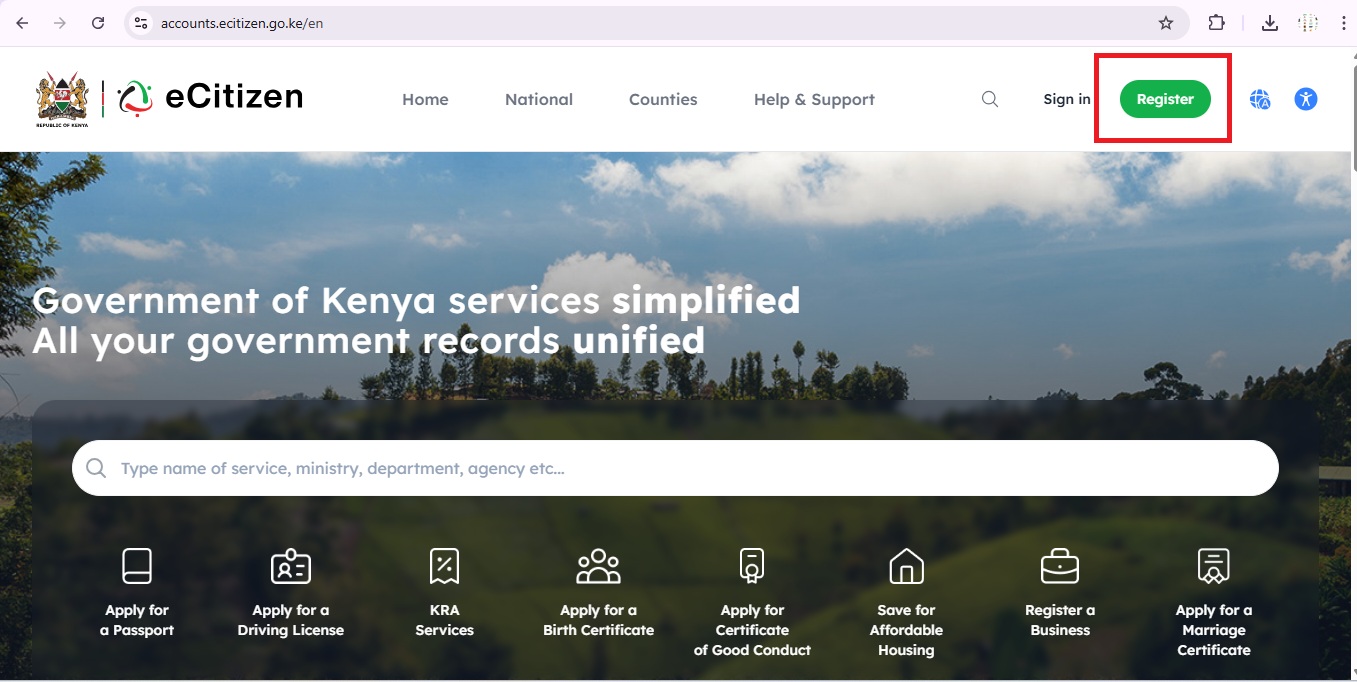 Step 3: Choose Account Type Select the appropriate account type:
This is one of the most important steps and where many people get confused. eCitizen has five different account types based on your citizenship or residency status. Choosing the wrong one will cause your application to fail at the validation stage.
Here's a detailed breakdown of each:
Citizen — For Kenyan Citizens
Select this option if:
You were born in Kenya and hold Kenyan citizenship
You have a valid Kenyan National ID card or are a Kenyan citizen aged 18 years and above
You are a Kenyan living locally or in the diaspora (abroad)
This is by far the most commonly used account type. If you're a Kenyan with a National ID, this is your option.
Resident — For Foreign Residents
Select this option if:
You are a non-Kenyan citizen but you live and reside in Kenya
You hold a valid Alien ID card issued by the Kenyan government
You are a foreigner who has been granted legal residence in Kenya
Foreign residents who need government services like KRA PIN registration should note that eCitizen registration is often a prerequisite. Speaking of which, if you need to apply for a KRA PIN as a non-Kenyan resident, our detailed article on KRA PIN registration requirements covers exactly what documents you'll need based on your specific situation.
KRA PIN Application for Non-Kenyan Resident/ Non-Kenyan Non-Resident
We provide fast, professional KRA PIN registration services through iTax and eCitizen portals. Exper...
Refugee — For Recognized Refugees
Select this option if:
You have been officially recognized as a refugee in Kenya
You hold a valid Refugee ID or Refugee Certificate issued by the relevant authority (UNHCR or the Department of Refugee Services)
You are currently living in Kenya under refugee status
Diplomat — For Diplomats in Kenya
Select this option if:
You are a foreign diplomat posted or working within Kenya
You are attached to an embassy, consulate, or international organization based in Kenya
You hold a valid diplomatic passport or diplomatic identification card
Foreigner — For Visitors to Kenya
Select this option if:
You are a visitor or tourist in Kenya and are not a resident
You hold a valid foreign passport
You do not have a Kenyan ID, Alien ID, or diplomatic credentials
You are in Kenya on a short-term basis — tourism, business visit, or transit
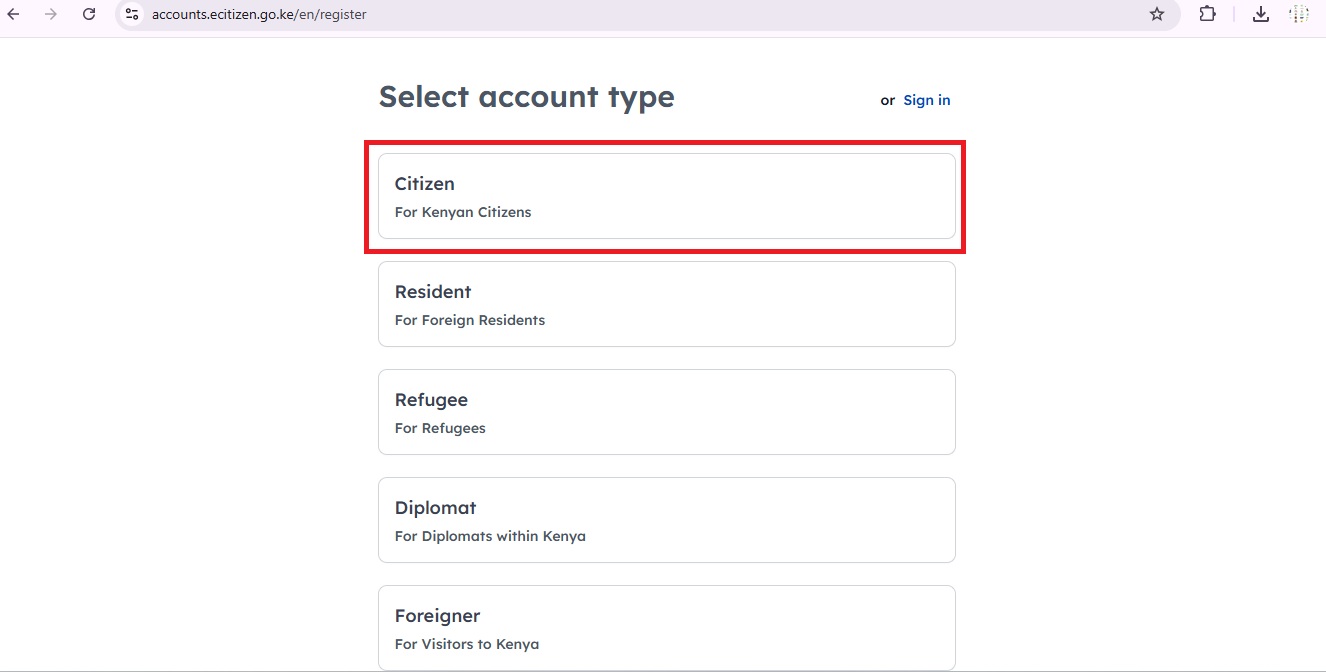
After clicking on Citizen, you will be taken to the next page where you will be required to fill in the following details:
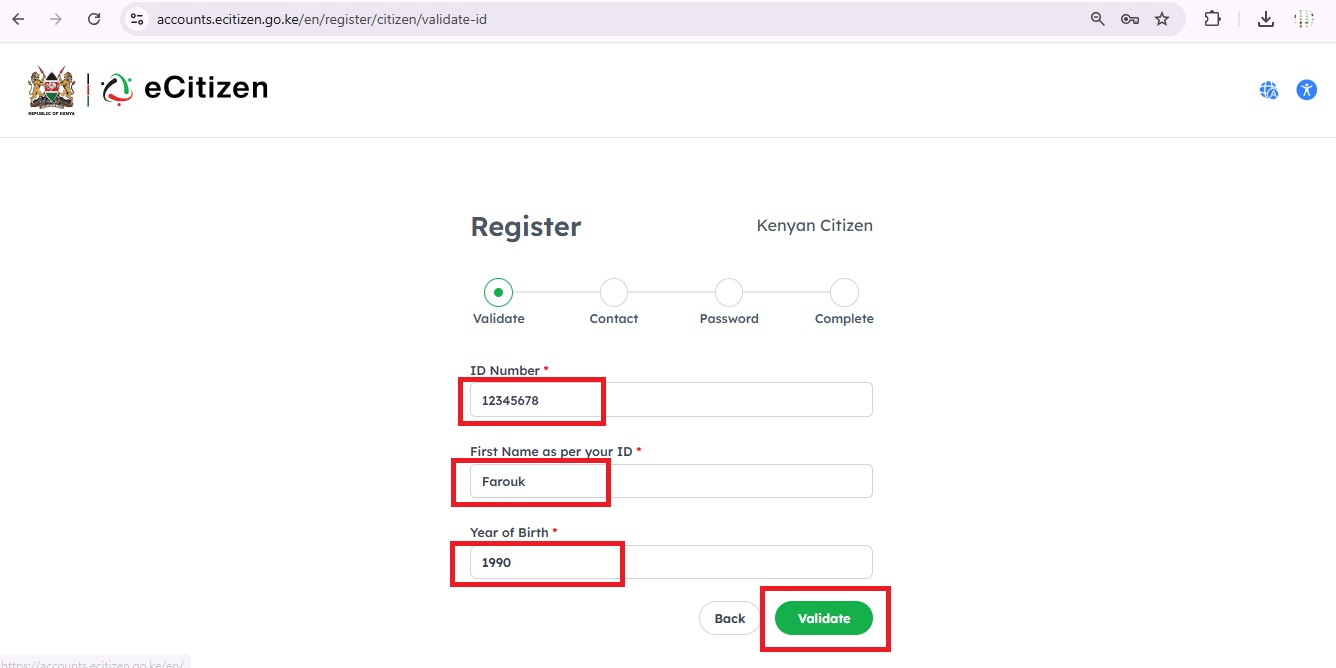
Step 4: Validation of your ID Number
After selecting your account type, you'll be taken to the ID validation page. This is where the system verifies your details against the government's national population register before allowing you to proceed.
You'll need to fill in the following three fields:
ID Number (Required)
Click on the "ID Number" field
Type in your Kenyan National ID number exactly as it appears on your physical ID card
Make sure there are no spaces or extra characters
Your ID number is typically 7 to 8 digits long
Important: The ID number you enter must match the one registered with the government. If the number is wrong or you type it with spaces, validation will fail and you will get an error.
First Name as Per Your ID (Required)
Click on the "First Name as per your ID" field
Type in your first name exactly as it appears on your National ID
Spelling must be 100% accurate — even a single wrong letter will cause validation to fail
Do not use nicknames, shortened names, or middle names in this field
Note: Hold your physical National ID card next to the screen and copy the name character by character. This is the single most common reason eCitizen registrations fail at this stage.
Year of Birth (Required)
Click on the "Year of Birth" dropdown
A list of years will appear — scroll to your birth year
Select the year that matches your National ID card
What Happens After You Click "Validate"?
Double-check all three fields against your physical National ID
Click the "Validate" button
The system cross-references your details with the National Population Register (Integrated Population Registration System)
If everything matches, you automatically proceed to the next step — Contact Details
If there's a mismatch, you'll see an error message — re-check your ID and try again
Step 5: Create Login Credentials
Once your ID is validated, you'll be prompted to enter your contact information. This usually includes:
Mobile phone number — This must be an active line as it will receive an OTP during verification. A Safaricom, Airtel, or Telkom number all work.
Email address — A working email where your account confirmation will be sent. Use an email you have regular access to.
Note: Use the same phone number you use for M-Pesa. Many government services, including payment for eCitizen transactions, are linked to mobile money. Keeping your contact details consistent avoids confusion later.
Step 6: Verify Your Account
Next, you'll set up the details you'll use to log in every time you return to eCitizen:
Username — Choose something memorable but not obvious. Avoid using just your name or ID number as a username for security reasons.
Password — Create a strong password of at least 8 characters. A good password mixes uppercase and lowercase letters, numbers, and a symbol (e.g.,
Nairobi@2026). Confirm it by typing it again in the second field.
Security reminder: Do not share your eCitizen password with anyone — including people offering to "help" you register. At Cyber Mfukoni, we guide you through the process but we never need your login credentials to assist you.
Step 7: Complete Registration
After setting your credentials, eCitizen will send a One-Time Password (OTP) to the mobile number you provided. This is a 6-digit code that confirms you are the owner of the phone number.
Check your phone for the SMS — it arrives within seconds to a couple of minutes
Enter the OTP in the field provided on the portal
Click "Verify" or "Confirm"
Didn't receive the OTP? Wait 60 seconds before requesting a resend. Make sure your phone has signal and is not on ''Do Not Disturb mode.'' If you're using a Safaricom line, also check that your promotional SMS inbox is not blocking messages.
Step 8: Log In to Your eCitizen Account
Once you have successfully completed your registration, you are now ready to log in to your eCitizen account and start accessing various government services online.
How to Log In
1. Go to the eCitizen Website
Open your web browser (Chrome, Firefox, Edge, etc.)
Type in the address: ecitizen.go.ke or accounts.ecitizen.go.ke/en/login
Press Enter to load the page
2. Click on "Sign In"
On the eCitizen homepage, click the "Sign In" button
You will be directed to the login page
3. Enter Your Login Credentials
You will be asked to provide:
Username or ID Number — Enter the username you created during registration or your National ID number
Password — Enter the password you set during registration
Make sure CAPS LOCK is off when typing your password as passwords are case-sensitive
4. Click "Sign In" or "Log In"
After entering your credentials, click the "Sign In" button
The system will verify your details
If correct, you will be taken to your eCitizen dashboard
5. OTP Verification (If Required)
In some cases, the system may send a One Time Password (OTP) to your registered phone number as an extra security step
Check your phone for the OTP message
Enter the OTP in the field provided
Click "Confirm" or "Verify" to proceed.
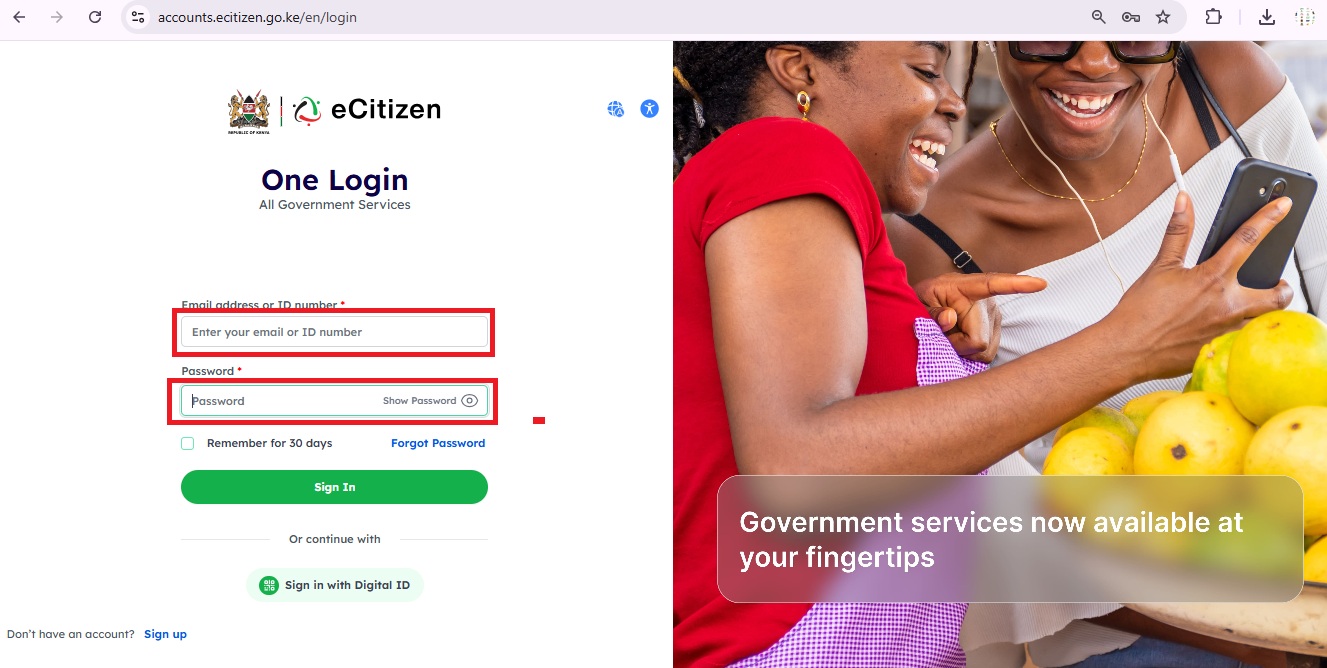
After successfully logging in to your eCitizen account, you will be taken to your personal dashboard where you can access a wide range of Kenyan government services all in one place. From the dashboard, you can apply for or renew your Kenyan passport through the Department of Immigration, manage your driving license and vehicle details through NTSA, apply for or retrieve your KRA PIN and file your tax returns through the Kenya Revenue Authority, and register a new business or company through the Business Registration Service.
You can also apply for an NHIF health insurance cover, access your NSSF social security contributions, apply for a Police Clearance Certificate (Good Conduct), and request birth, death, or marriage certificates through the Civil Registration Services. Additionally, you can access land search and land rate payment services, apply for a HELB student loan, pay for various government fees and levies online, and track the status of any application you have previously submitted. All these services are conveniently available online, saving you the time and effort of having to physically visit different government offices across the country.
KRA PIN Update
We provide expert KRA PIN update services through iTax portal. Fast assistance with name changes, ad...
Related Agency
Kenya Revenue Authority
KRA
We provide professional online KRA tax application services including PIN registration, tax returns filing, iTax support, compliance certificates, VAT registration, and customs clearance. Trusted by hundreds of clients.
View Agency ServicesRelated Services
Need Expert Assistance?
Our team can handle the entire application process for you.